Dark mode for git gui
This is a short, mostly “note to myself”, because this took an annoyingly long time to work out, and there is a lot of conflicting advice.
git gui is still the best frontend to selectively stage
changes for cohesive commits or fixups. git add -p at best
does the same job for entire hunks, or requires much more interaction
for specific line sets. IDEs and their extensions tend to elide the full
power of git at inconvenient times.
Still, it would be nice to use classic tools without the sudden change in brightness burning out your eyes with the force of a thousand suns.
Setting up gitk was simple enough:
https://github.com/dracula/gitk.git works exactly as described.
For git gui, there’s an open issue on git
gui about this, which doesn’t seem to be going anywhere, and
suggests many approaches which didn’t work for me. Elsewhere, there were
recommendations to source theme files directly from
.wishrc, which I couldn’t get to work.
What did work was to install Debian’s tcl-awthemes, and
set the theme to awdark in .Xresources:
! To update live: echo '*TkTheme: awdark' | xrdb -merge -
! Use the awdark theme from the tcl-awthemes packages for git gui, gitk, etc
*TkTheme: awdark
As indicated, echo '*TkTheme: awdark' | xrdb -merge - is
needed unless you want to log out and back in again.
However, with a fresh install, this still keeps the title bar in light mode.
Going through my usual process step by step, the title bar is themed
correctly after setting Settings tab ->
Miscellaneous options -> Dark mode ->
Prefer dark mode in the cinnamon Themes application, then
after completing up to and including the third of the following
commands:
gsettings set org.gnome.desktop.interface color-scheme 'prefer-dark'
gsettings set org.gnome.desktop.interface gtk-theme Adwaita-dark
gsettings set org.cinnamon.desktop.interface gtk-theme Adwaita-dark
gsettings set org.cinnamon.theme name 'Adwaita-dark'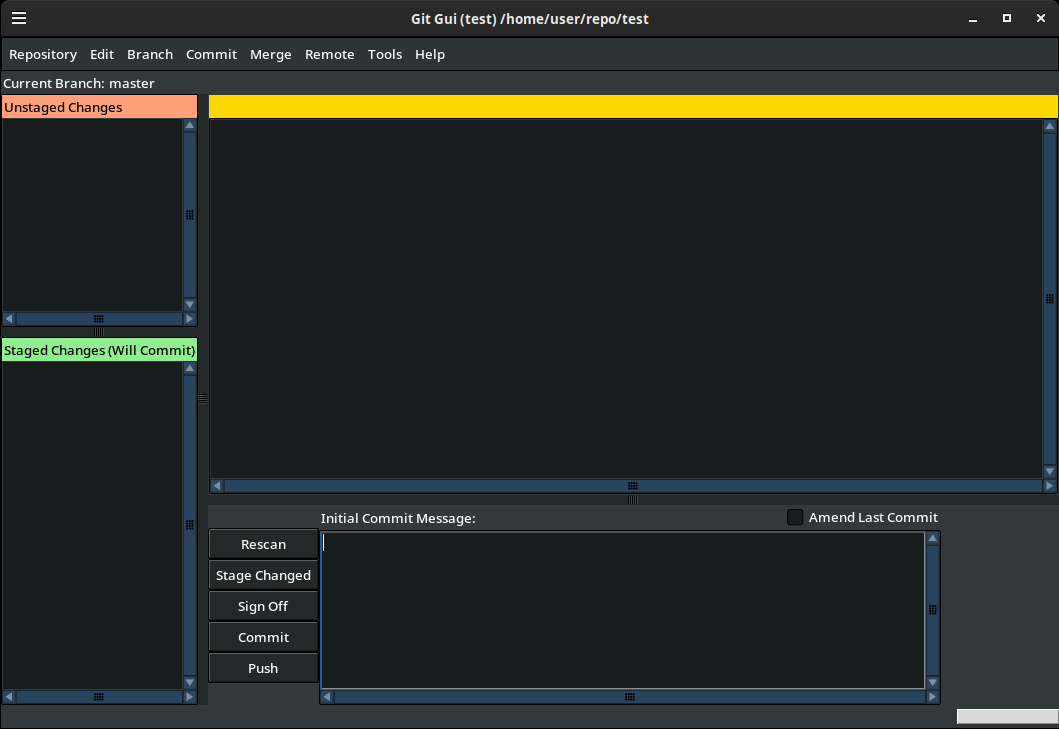
I haven’t tried this under Wayland. Maybe there, TK will look at
.Xdefaults instead of using the .Xresources
database, and I should create a symlink now to avoid strife for
Future!Me. For now, I will not, since I’m curious to see what will
happen when I do migrate.
Being able to dig deep at a moment’s notice is a big part of why I appreciate the Linux ecosystem. But every once in a while, I encounter enough balkanization that leaves me very sad.
On the other hand, I run
journalctl -b -g screensaver -n 20 to look for PAM errors
forbidding setuid to the screensaver, to get the timestamp for exactly
when I came back from a break. There is a certain beauty in appreciating
something figuratively held together with duct tape and string, no matter how horrifying.